
File 1 specification#
Last modified: 28 Sep 2026
The File 1 format includes permission flags for:
inclusion in UK LLC
linkage to NHS England and NHS Wales records
linkage to place-based (geographic) data
linkage to administrative data
The File 1 must be in a specific format as outlined in the File 1 formatting table
Each participant must have a ‘current row’ where all variables are populated with the best estimate of CURRENT information (ROW_STATUS=C).
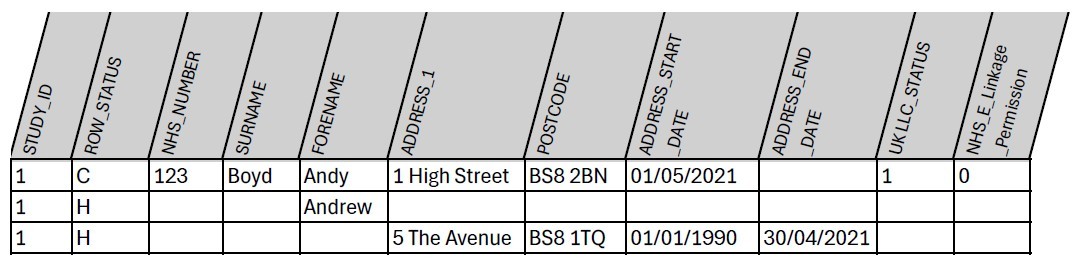
Subsequent rows (with the same participant STUDY_ID) are populated with alternative, HISTORICAL value(s) only (ROW_STATUS=H). Leave all other values as null in the historical rows. For historical addresses, populate all address and postcode fields and the start/end date fields (see Table 1).
If a participant withdraws from the LPS or no longer permits the flow of their identifiers for linkage, you must set their permission flags in the ‘current’ row accordingly to stop their data flowing. For example, if a participant withdraws consent to share their data with UK LLC, set their UKLLC_STATUS to 0 in the ‘current row’.
If a participant withdraws permission for their identifiers to be shared with UK LLC, these variables can be set to NULL, as long as study_id and all permission flags are present.
Table 1: Example File 1 content for a single fabricated LPS participant - in this example a limited number of variables is shown (see the File 1 formatting table for the full list)
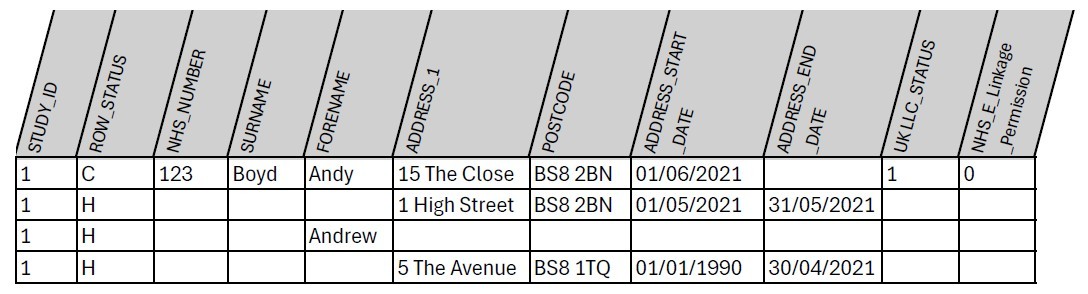
When an updated File 1 is provided, this should be built using the information that is current at the time – i.e. any new information, such as a new address, will be added to the ‘current’ row, and old information will be relegated to the ‘historical’ row(s) – see example in Table 2.
Table 2: Example of updates in File 1 content (new address) for the same fabricated LPS participant
Permission flags#
There are 34 fields that should be completed, including permission flags. These are described in the File 1 formatting table.
Permission flags indicate if a participant’s identifiers can be shared for linkages and with whom. Flags can be set at an individual participant level or at an LPS level. In Table 1 above, the participant with STUDY_ID 1 (Andy Boyd) has consented to have data flow to UK LLC (UKLLC_STATUS=1), but has not consented to NHS England Linkage (NHS_E_Linkage_Permission=0).
Linkages#
If indicated by the NHS_E_Linkage_Permission field and NHS_W_Linkage_Permission field, participants are linked with their English health records (NHS England) and Welsh health records (NHS Wales), respectively.
Where an LPS has already linked their cohort with an NHS agency, then they should include participants’ NHS Digital study number so that the existing linkage can be replicated for UK LLC. This will be efficient and aid consistency of linkages across different datasets.
We acknowledge that there will be instances where data may be incomplete, e.g. missing day of birth; gaps in timeline of past addresses; missing or incomplete start and end dates for addresses. Any information you can provide is helpful, even incomplete NHS numbers (if allowed by your DSA with NHS England). When these data are used for performing linkage, partial information can increase the chance of linkages being successful.
Place-based data#
There are four place-based permission flags that specify if the LPS approves the following linkages:
a. Geocoding_Permission
b. Small_Area_Permission
c. Environment_Permission
d. Property_Level_Permission
More information on each of these is provided in lines 26 – 29 of the File 1 formatting table.
If indicated by the Geocoding_Permission field, DHCW shares participants’ address history with agreed partners (masked by the inclusion of additional addresses) for linkage to geocoded data. The partners do not receive any information except encrypted STUDY_ID, full address or postcode, and address start and finish dates. For more information on place-based data processing and linkage visit UK LLC Guidebook.
Address start and end dates are used, e.g. to calculate exposure to air pollution. In these cases, even incomplete temporal information is of use, so providing the year of start and end at a residence is of value and will allow for more accurate calculations of air pollution exposure.
File 1 formatting#
The personal identifiers data file (File 1) should be provided in .csv (comma delimited file) format. If your exported .csv file has empty cells with spaces, please delete these spaces, setting the values of the empty cells to null/empty.